

How to Create Your API Key
Overview
ZoneVu generates API Keys on a per‑user basis. Each API Key uniquely identifies the authenticated user and allows access to Projects, Wells, and other Data Objects through the ZoneVu API. Because the API uses the user’s identity, all actions performed through the API are governed by the Roles assigned to that user. This means users can only perform actions that their Role permissions allow—including read, write, or administrative operations.
Since an API Key grants access equivalent to the user’s account permissions, it must be treated as highly confidential. Users should never share their API Key with anyone else, including coworkers, contractors, or external third parties. Sharing an API Key exposes Company data and can grant unintended access to sensitive Projects or Data Objects.
API Keys expire based on the timeframe selected during creation and must be regenerated once expired.
Prerequisites
A valid ZoneVu profile
API Rights on your profile
API access rights for your ZoneVu Account
Steps to Generate Your API Key
Log into ZoneVu.
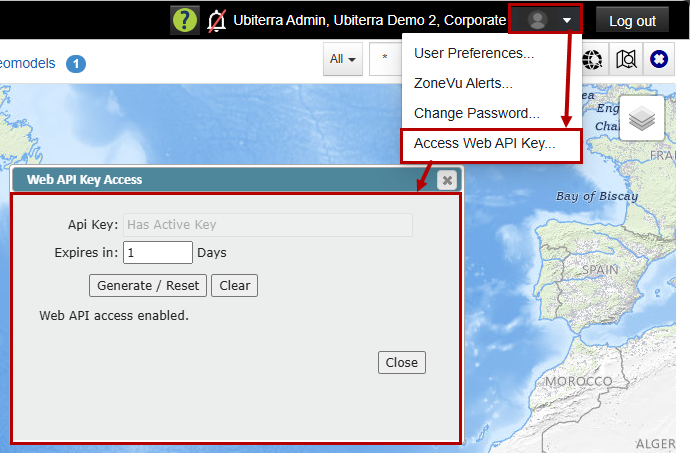
In the upper‑right corner of the Home Page, click on your circular profile icon, and select (Access Web API Key…).
In the 'Web API Key Access' dialog, choose your desired expiration timeframe.
Note: The recommended expiration timeframe may vary depending on the company guidelines.Click the 'Generate' button.
A new API Key will appear.
Save the key for later use in your SDK or API workflow.
Note: You must repeat this process each time your key expires or if you regenerate a new one.
Using Your API Key in the ZoneVu SDK
A fully supported Python Software Development Kit (SDK) has been published on PyPI. This SDK allows users to interact directly with the ZoneVU API programmatically using their API Key and assigned Roles permissions.
After generating your API Key, you can provide it to the ZoneVu SDK in multiple ways. The two easiest methods are:
Method 1 — Paste Your API Key Directly into the Script
This method is the simplest and is recommended for users who are just learning the SDK.
Open your Python script or Jupyter notebook.
Locate the function that accepts a direct key parameter (for example, the
hellofunction in thezonevulibrary).Paste your API Key between the quotation marks in the appropriate line of code.
Run the script to return a list of Wells in your Project.
Example:
from zonevu import hello

api_key = "PASTE-YOUR-API-KEY-HERE"
hello(api_key)
Method 2 — Store Your API Key in a JSON File
This method is more secure and recommended for users who will reuse the SDK regularly or share their scripts.
Create a new JSON file containing your API Key.
Save the file to the designated ZoneVu configuration folder on your C: drive.
C:\Users\YourUserName\zonevu_keyfile.json
Use a single line of code to load the API Key automatically each time you run the SDK.
Note: the API Key File must be named 'zonevu_keyfile.json'. Also, you can only have one key in the file with no other commented-out lines.
{
    "apikey": "xXxXxXx-xXxXxXx-xXxXxXxX"
}
Related Links:
ZoneVu Swagger Site: https://zonevu.ubiterra.com/swagger
ZoneVu Python SDK: https://pypi.org/project/zonevu/