A common task when working with ZoneVu is to export geosteering interpretations. The ZoneVu Python SDK can be used for this purpose.
ZoneVu stores and exports geosteering interpretations in an efficient format (ZoneVu Geosteering Interpretation format, or ZGI). It is very easy to retrieve interpretations using the Python SDK, and the SDK includes utility functions to expand the exported interpretation into a more familiar format.
The ZGI format is a Python / JSON data structure that looks like this:
Interpretation - The parent data structure
List of Picks
A pick is the beginning of a geosteering block (aka "segment") or of a fault. Stored in MD-order. These are the actual measurements made by the geosteerer.
List of CurveDefs
A list of which well log curves (both from target ("subject") and type well) are used by the interpretation
List of Horizons
A list of which formations are included in the geosteering cross-section
List of TypeWellHorizonDepths
A list of well tops for the included formations (via the Horizons) from the type well that represents the "hangs" for the horizons, that is, TVD depths and TVT thicknesses from the TVD depth of the Target Horizon
Note that all formations in ZoneVu (as used by Horizons, Drilling targets well tops, depth models, etc.) are centrally managed by the designated stratigraphic column for a particular well, geosteering interpretation, project, etc. This is similar to how formations are managed in systems such as Petrel and Kingdom.
Here is some sample code (see the example "zonevu/examples/geosteering/PrintBlocks.py") on how to retrieve a geosteering interpretation and convert it into an easy-to-use list of blocks, layers, faults, and throws.
First, go into ZoneVu and generate a web API key. There are some pre-requisites:
The ZoneVu account in question must have the Web API enabled. Ubiterra Support can enable this for you.
You must be an authenticated user in that ZoneVu account in order to be able to generate a Web API key.
Since ZoneVu is an enterprise class system, all users are assigned rights by the ZoneVu company administrator user. The user must have been assigned certain rights for this scenario to work. Specifically, the user must have the Web API right and the right to download well data.
Note that ZoneVu Web API the ZoneVu company administrator user or Ubiterra Support can assign these rights.
Note that ZoneVu Web API keys have a maximum “time to live” of 30 days. You will need to get another key when a particular key expires.
Create ZoneVu Python client:
zonevu = Zonevu.init_from_apikey(api_key)Get the well you want to work with:
well_svc = zonevu.well_service
well = well_svc.get_first_named(well_name)
Load geosteering interpretations onto the well:
well_svc.load_well(well, {WellData.geosteering})  # Load geosteering into well
wellbore = well.primary_wellbore  # Get reference to wellbore
Get the first or the starred geosteering interpretation:
interps = wellbore.interpretations
interp = next((g for g in interps if g.starred), interps[0]) # In ZGI format
Convert geosteering interpretation into a more familiar list of blocks (segments) and faults:
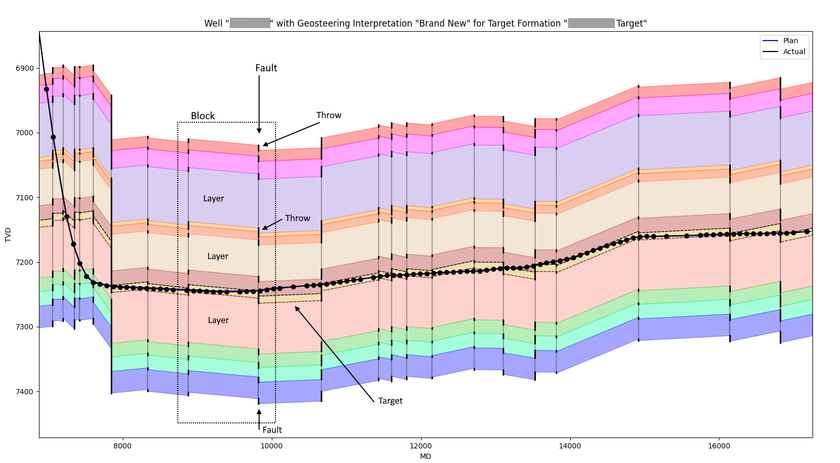
blocks, faults = make_blocks_and_faults(interp)A ZoneVu Block is a data structure that contains information about a particular block ("segment") within a geosteering interpretation. It has data members for:
Start and stop MDs, XYs, GeoLocations, Target TVDs as well as length, dip, and inclination of the block
A list of Layers, that define all the layers for that block, one for each horizon and its formation.
Note that exact geolocations of wells and projects in ZoneVu are available because all data in ZoneVu is geospatially registered.
Here are some of definitions of the data structures created by the make_blocks_and_faults() function:
A ZoneVu Fault is a data structure that contains information about a particular fault within a geosteering interpretation. It has data members for:
MD, XY, GeoLocation, start and stop TVD as well as length, and trace of the fault.
A list of Throws, that define the start and stop TVD for each horizon.
It provides properties for the polygon of a block layer and the polyline of a fault throw or trace, which are convenient to use for plotting or geometric calculations.
Here is a plot that illustrates the Block, Layer, Fault, and Throw entities. This plot was made using "zonevu/examples/plot/CrossSection2.py", which utilizes the above make_blocks_and_faults() function.