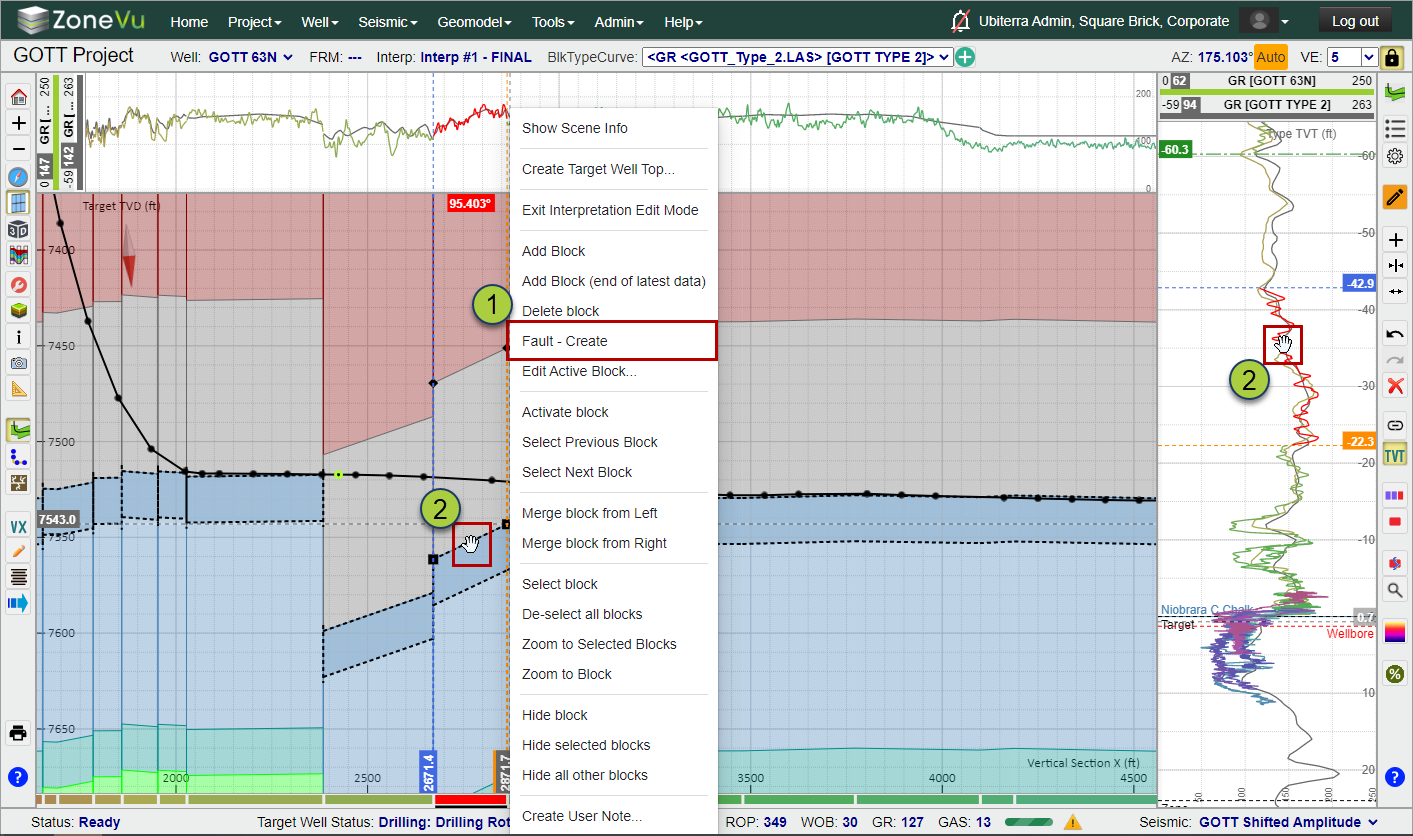
There are two ways to add a fault to your Geosteering Interpretation: through a right-click option or using your mouse to "Fault" the entire block up/down.
To add a fault using the right-click option, right-click on the black diamond or square at the beginning or end of a Geosteering Block in the cross-section and select "Fault -Create". This will convert the beginning/end of a Geosteering Block into a fault. Likewise, you can also right-click on the beginning/end of a Geosteering Block on the Vertical Correlation Track and select "Fault - Create".
You can also grab the Geosteering Block along a formation boundary or the associated GR data in the Vertical Correlation Track (Red colored data) and "Fault" the entire block up/down. ZoneVu will change the mouse cursor icon to indicate what operation you are about to perform. ZoneVu uses the hand icon to indicate that you are about to fault the active Geosteering Block.
To remove a fault, right-click on the black diamond or square at the beginning or end of a Geosteering Block in the cross-section and select "Fault - Close".