

In ZoneVu, you can bulk import Wells, including the header information, deviation surveys (Plans & Actuals), and top data. This article will walk you through the process of bulk importing Well data and detail the different tabs and columns in the Well Import Spreadsheet. You can download the most up-to-date version of the Well Import Spreadsheet here: Bulk Well Import Spreadsheet Download
Bulk Importing Well Data:
Under the "Well" dropdown, select "Import Wells..."
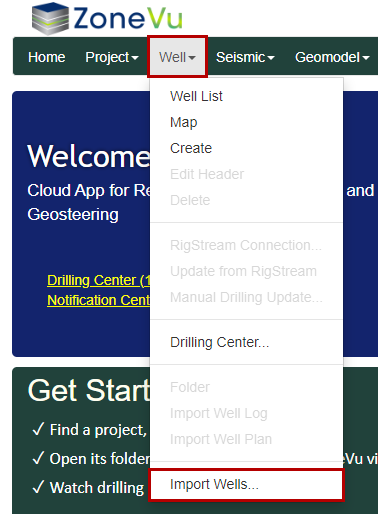
Drag & drop or select the Bulk Import Spreadsheet
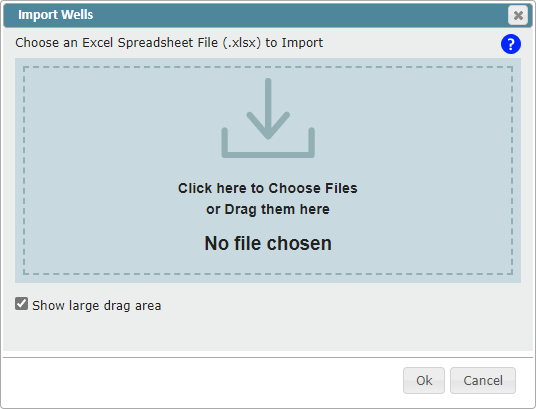
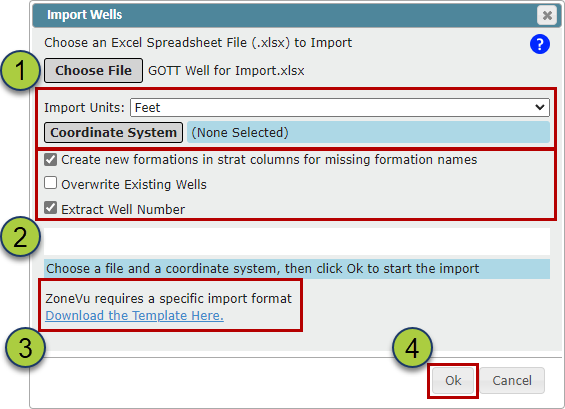
Choose the Coordinate System
Note: ZoneVu can import Surface Hole locations in any coordinate system, but all Wells in a single import sheet must use the same coordinate system
Choose what other import options you need
"Create new formations in start columns for missing formation names" checkbox: When checked on, the importer will add any missing formation tops into the assigned Strat Column
Please note, formation names are case-sensitive
"Overwrite Existing Wells" checkbox: when checked on, the importer will overwrite any existing Wells with the data found in the Import Spreadsheet
Please note, this is an undoable event
"Extract Well Number" checkbox: When check on, the importer will automatically extract the Well number if it is contained at the end of the Well name
You can download the Import Spreadsheet using the "Download the Template Here" hyperlink
Click the "OK" button to start the import
Other Notes:
Note: There is no undo feature when bulk importing wells. Also, a well does not need tops or surveys to import correctly.
In order to import a well into a specific project, make sure that the project exists BEFORE beginning the bulk import, and that the project is properly named in the import template.
Make sure that the named Division for each well exists as a Business Unit in your company before beginning the bulk import.
Note: The 'Corporate' business unit always exists and cannot be removed.
Make sure that the named Stratigraphic Column for each well exists in the database before beginning the bulk import.
Bulk Well Import Spreadsheet: Bulk Well Import Spreadsheet Download
Well Import Spreadsheet Format:
Only the Well UWI, Name, Number, Latitude (Y), Longitude (X), Elevation, Elevation Units, Elevation Type, and Division columns on the "Wells" tab are required. All other data in the Spreadsheet is optional. ZoneVu uses the Column Headers and Tab Names to import the data, the Column order does not matter.
The column headers have been colored to help guide what data is Required (Yellow), Highly Suggested (Grey), Suggested (Light Grey), and optional (White).

Wells tab:
The "Wells" tab contains the Well header information is referenced by the other three tabs
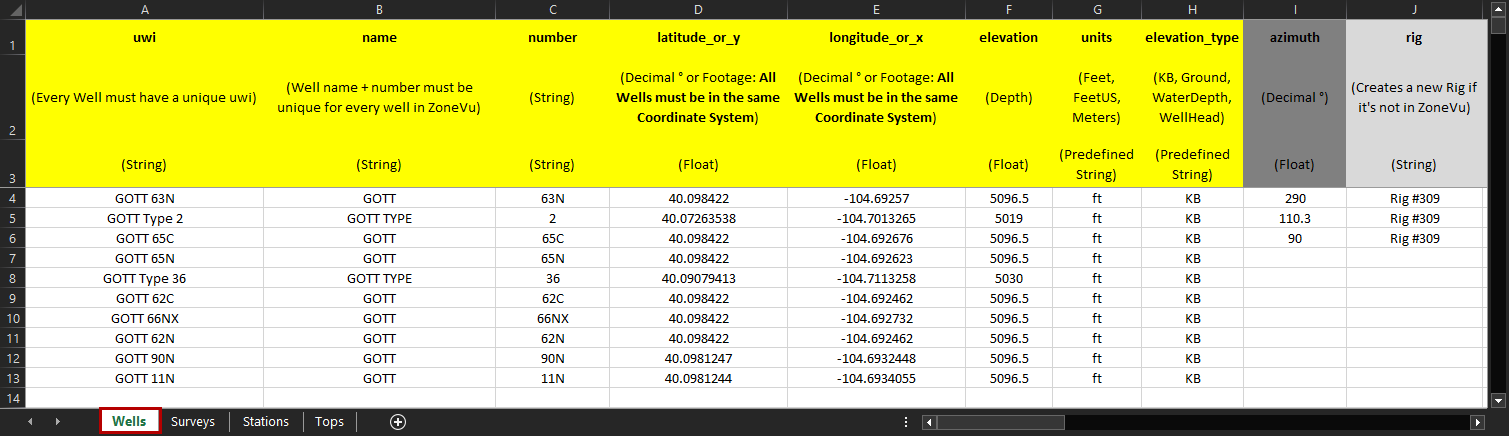
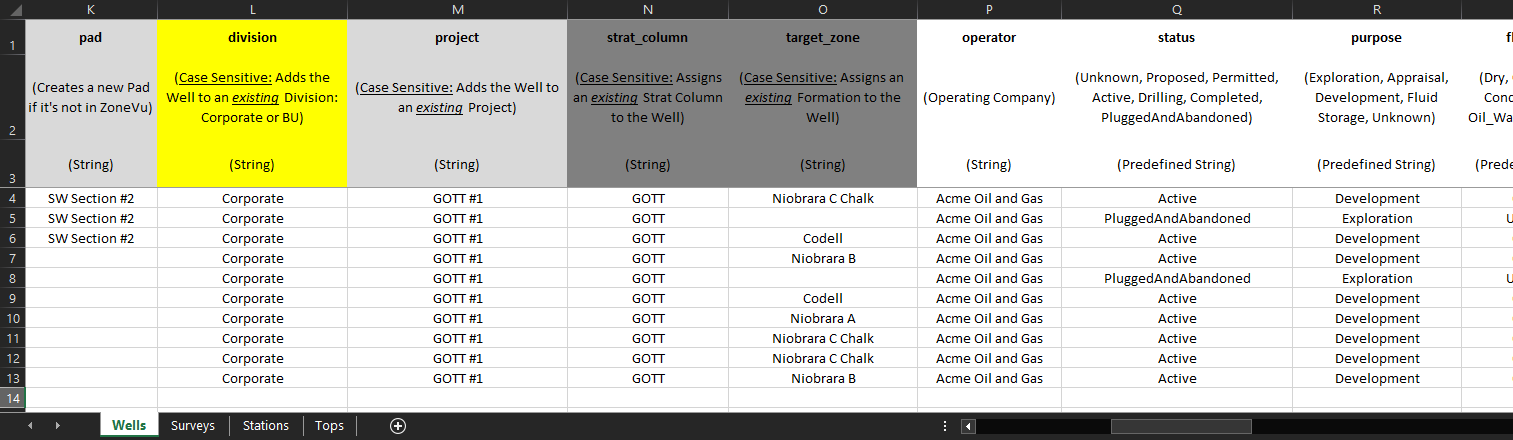
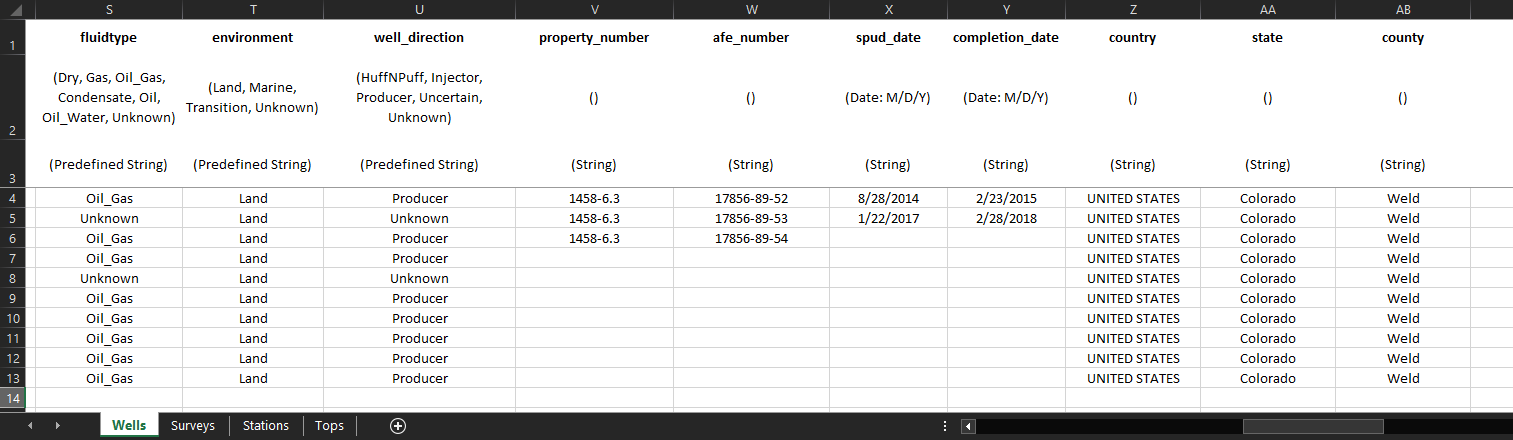
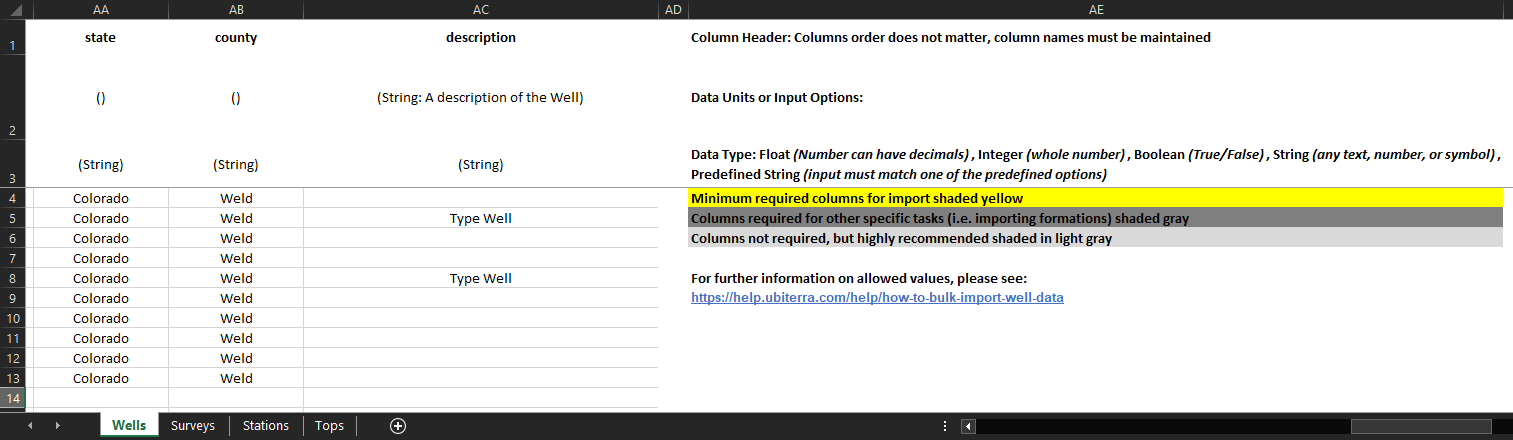
uwi (text): Well UWI. Every Well in your ZoneVu account must have a unique UWI and does not have to be a number
name (text): Well name. Every Well in your ZoneVu account must have a unique Name Number Pair (Name + Number) and does not have to be a number
number (text): Well number. Every Well in your ZoneVu account must have a unique Name Number Pair (Name + Number) and does not have to be a number
latitude_or_y (integer): Decimal ° or Footage: All Wells in the same Import Spreadsheet must use the same Coordinate System
longitude_or_x (integer): Decimal ° or Footage: All Wells in the same Import Spreadsheet must use the same Coordinate System
elevation (integer): Well's reference elevation (KB, Ground, Water Depth, or Wellhead)
units (PDT): Well's reference elevation unit
PDT: Feet, feet, FT, ft, F, f, FeetUS, US, us, Meters, meters, M, m
elevation_type (PDT): Specifies the Well reference elevation type
PDT: KB, Ground, WaterDepth, WellHead
azimuth (decimal °): Azimuth is used to calculate the Vertical Section footage. If no input is provided, ZoneVu will auto-calculate the Wellbore Azimuth from the Well Plan or Actual Deviation Survey set, whichever is longer.
Note: If the Wellbore Azimuth in ZoneVu does not match the Well Plan, the Vertical Section calculations in ZoneVu will differ from the Rig Data
rig (text): Specify the Rig name, which allows you to sort the Well List by specific Rigs
pad (text): Specify the Pan name, which allows you to sort the Well List by a specific Pad
division (text): Assign this Well to an existing Business Unit, case-sensitive (Corporate or user created Business Unit)
project (text): Assign this Well to an existing Project, case-sensitive
strat_column (text): Assign this Well to an existing Strat Column, case-sensitive
target_zone (text): Assign the geologic target for the Well, this Formation must be present in the assigned Stat Column, case-sensitive
operator (text): Specify who the operator of the Well is
status (PDT): Assigns the current status of the Well
PDT: Active, ActiveInjecting, ActiveProducing, Completed, Drilling, PartiallyPlugged, Permitted, PluggedAndAbandoned, Proposed, Sold, Suspended, TemporarilyAbandoned, Testing, Tight, Unknown, WorkingOver
purpose (PDT): Specify the purpose of the Well
PDT: Appraisal, Appraisal_Confirmation, Appraisal_Exploratory, Development, Development_InfillDevelopment, Development_Injector, Development_Producer, Exploration, Exploration_DeeperPoolWildcat, Exploration_NewFieldWildcat, Exploration_NewPoolWildcat, Exploration_OutpostWildcat, Exploration_ShallowerPoolWildcat, FluidStorage, FluidStorage_Gas, GeneralServices, GeneralServices_BoreholeReacquisition, GeneralServices_Observation, GeneralServices_Relief, GeneralServices_Research, GeneralServices_Research_DrillTest, GeneralServices_Research_StratTest, Mineral, Unknown
fluidtype (PDT): Specify the produced fluid type of the Well
PDT: Air, Condensate, Dry, Gas, Gas_Water, Non_Hydrocarbon_Gas, Non_Hydrocarbon_Gas_CO2, Oil, Oil_Gas, Oil_Water, Steam, Unknown, Water, Water_Brine, Water_FreshWater
environment (PDT): Specify the environment of the Well
PDT: Land, Marine, Transition, Unknown
well_direction (PDT): Specify the business intention for the Well
PDT: HuffNPuff, Injector, Producer, Uncertain, Unknown
property_number (text): Property number associated with the Well
afe_number (text): Well's AFE number
spud_date (date: M/D/Y): Spud date of the Well
Note: Numbers, '-' and '/'; ex: 10/16/2020
completion_date (date: M/D/Y): Completion date of the Well
Note: Numbers, '-' and '/'; ex: 10-16-2020
country (text): Country the Well resides in
state (text): State the Well resides in
county (text): County the Well resides in
notes (text): Any notes about the Well
***PDT (Pre-Defined-Text): Denotes columns where the Bulk Well Importer is looking for specific text input. All available PDT inputs will be listed under the column description
Surveys tab:
The Surveys sheet is required if you also have data in the Stations sheet, otherwise it is optional. It is used to define meta-data about a Well's planned and actual deviation surveys
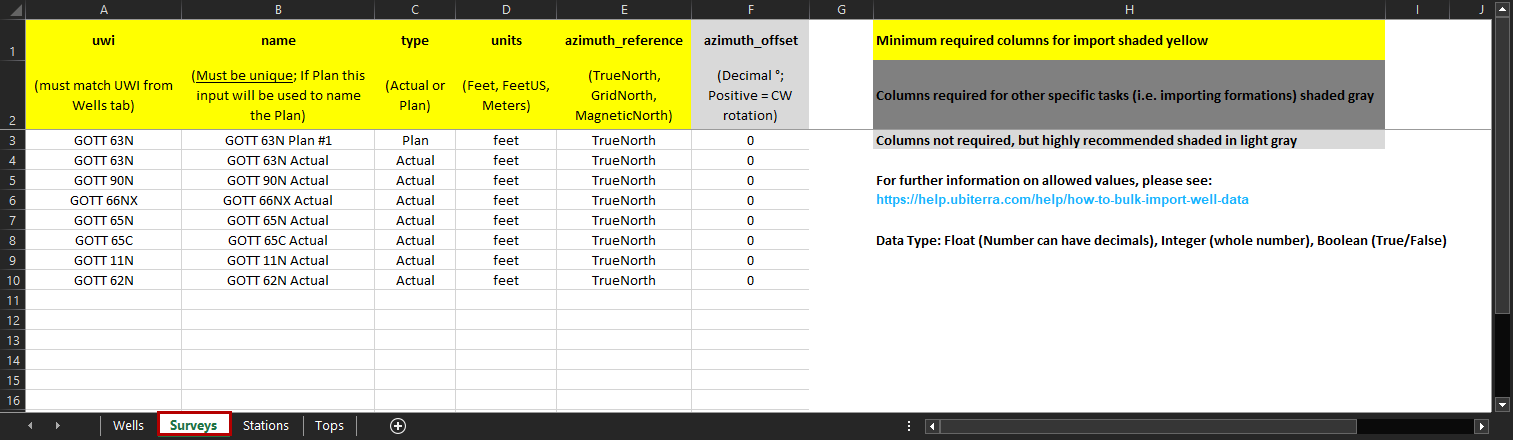
uwi (text): UWI of the associated Well. This must match the UWI defined on the "Wells" tab, case-sensitive
name (text): Reference name used on the Stations tab to assign which Plan or Actual Deviation Survey the survey station data corresponds to. If this is a plan, the text in this input will be used to name the Well Plan
type (PDT): Denotes if this Survey set relates to a Well Plan or Actual Deviation Survey. ZoneVu only supports one Actual Deviation Survey per Well
PDT: Actual, Plan, Planned
Units (PDT): The survey's depth units. It may be used to override the Well depth units for this sheet and the sheets that reference it
PDT: Feet, Ft, F, FeetUS, US, Meters, M
azimuthal-reference (PDT): Denotes the azimuth reference of the survey station azimuth values
PDT: Grid, GridNorth, Mag, Magnetic, MagneticNorth, True, TrueNorth, Unknown
azimuth_offset (decimal°): The azimuth value's offset in degrees from true north. Should not be empty if the azimuth reference value is any value except "True" or "True North". A positive number applies a Clockwise correction
***PDT (Pre-Defined-Text): Denotes columns where the Bulk Well Importer is looking for specific text input. All available PDT inputs will be listed under the column description
Stations tab:
The Stations sheet is optional. It contains values that represent a Well's planned and actual deviation surveys.
Note: ZoneVu can build a Well path based on MD, Inclination, & Azimuth or MD, TVD, X-Offset, & Y-Offset. If both datasets are provided ZoneVu will use MD, TVD, X-Offset, & Y-Offset.
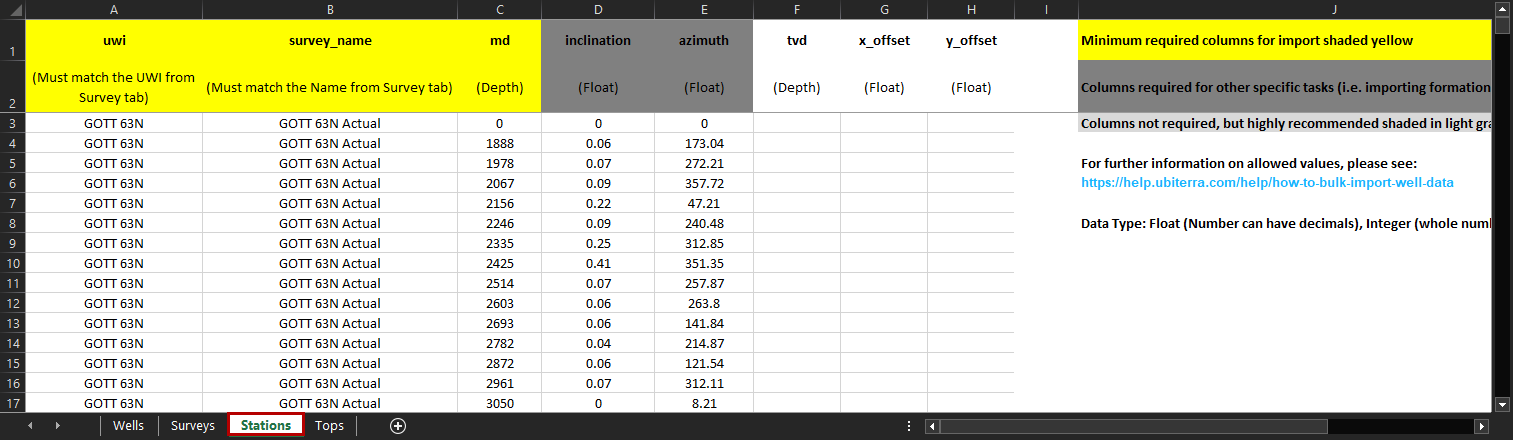
uwi (text): UWI of the associated Well. This must match the UWI defined on the "Wells" and "Surveys" tab, case-sensitive
survey_name (text): Reference name defined on the "Surveys" tab, case-sensitive
md (integer): Measured depth of the survey station
inclination (decimal °): Inclination data related to the survey station, drillers inclination (0° = straight down, 90° = horizontal)
azimuth (decimal °): Azimuth value of the survey station
tvd (integer): The true vertical depth of the survey station
x-offset (integer): The offset of the survey station in the East-West direction
y-offset (integer): The offset of the survey station in the North-South direction
Tops tab:
The Tops sheet is optional. It contains values that represent a well's Tops (formation picks). If the "Create new formations in strat columns for missing formation names" option is active during import and there is no matching formationname for a formation in the referenced Well's Strat Column then new formations will be created using the formation data from this sheet. To be valid, a row must contain a value for either the md, tvd or elevation columns
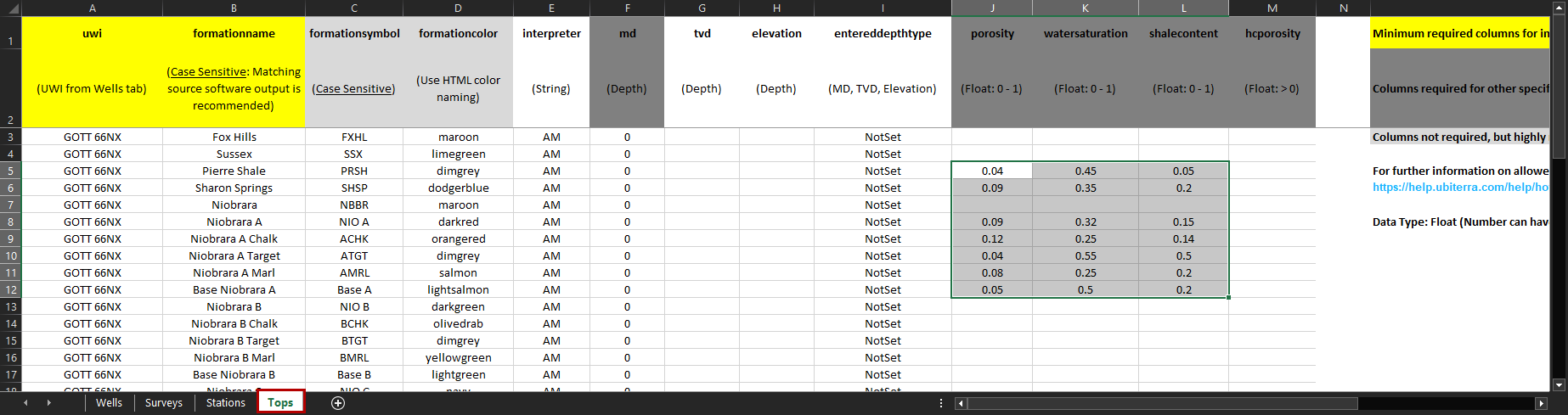
uwi (text): UWI of the associated Well. This must match the UWI defined on the "Wells" tab, case-sensitive
formationname (text): The name of the Formation the pick represents. This should match the related formation in the associated Strat Column, case-sensitive
formationsymbol (text): The symbol of the Formation the pick represents, no character limit
formationcolor (text): The color of the Formation the pick represents. Any HTML color name. See HTML Color Names
interpreter (text): The person (etc.) responsible for the pick
md (integer): The measured depth of the pick
tvd (integer): The true vertical depth of the pick
elevation (integer): The elevation of the pick. Positive above sea level
entereddepthtype (PDT): The type of depth value that should be used to calculate the other depth values for the pick
PDT: Elevation, MD, TVD
porosity (integer): The pick's Porosity (ϕ)
watersaturation (integer): The pick's Water Saturation (Sw)
shalecontent (integer): The pick's Volume Shale (Vsh) Content
hcporosity (integer): The pick's Oil Saturation x Porosity x Hydrocarbon (SoϕH)
***PDT (Pre-Defined-Text): Denotes columns where the Bulk Well Importer is looking for specific text input. All available PDT inputs will be listed under the column description