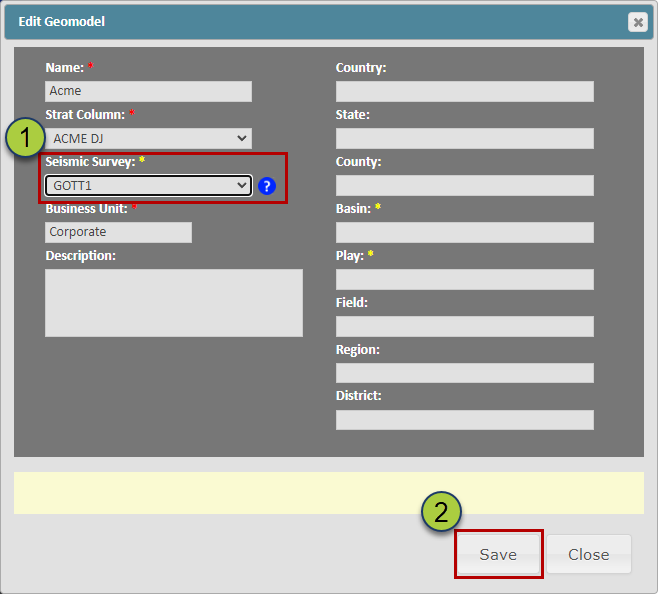
Adding a Seismic Survey to a Geomodel allows you to create Structural Surfaces from the Seismic Horizon data. This in turn enables you to shift, warp, and create Zones from the associated Seismic Data. This article walks through the process of adding a Seismic Survey to an existing Geomodel.
Note: You can add a Seismic Survey to a Geomodel when you first create a Geomodel (Related Article: Loading and Creating Data in a Geomodel)
Adding a Seismic Survey to a Geomodel:
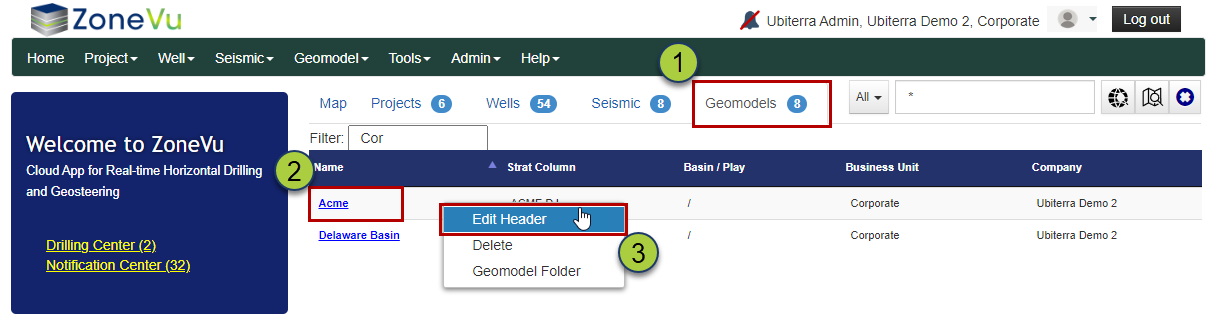
Navigate to the Geomodel List by selecting the Geomodel tab on the Home Page
Find the Geomodel you want to add the Seismic Survey to
Right-click next to the Geomodel Name and select "Edit Header", this will open up the "Edit Geomodel" dialog box
Use the "Seismic Survey" dropdown to select the Survey you want to add to the Geomodel
Click the "Save" button to save your selection