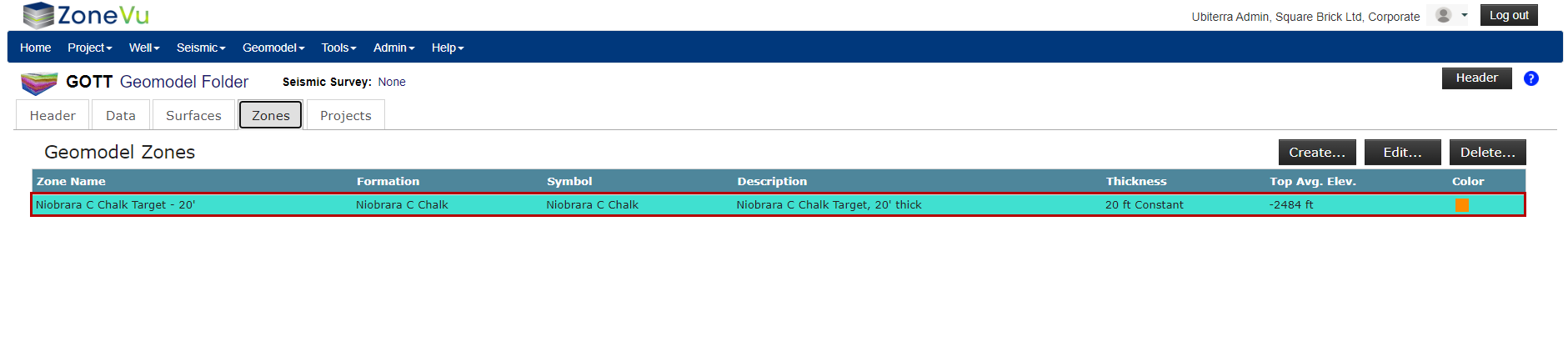
Zones are Structural Surfaces that have been given a thickness. To create a Zone, you will select an existing Surface and assign a thickness variable. These variables can be a Constant Thickness, Variable Thickness based on an Isopach, or another Surface creating a bounding Surface.
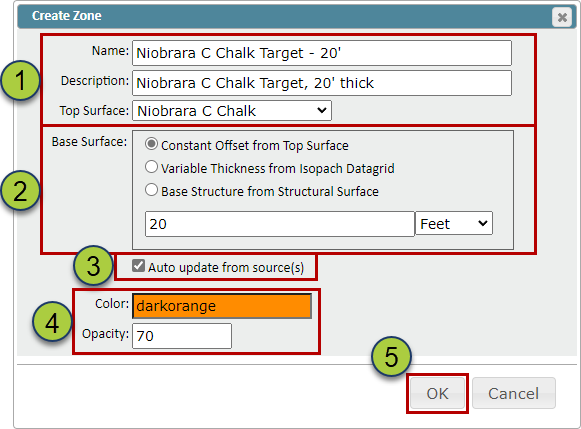
On the “Zones” tab in the Geomodel, select the “Create” button to open the “Create Zone” pop-up
Name your Zone, add a description (Optional), & select the Surface
Select what thickness variable to apply to the Surface: Constant Thickness, Variable Thickness based on an Isopach, or another Structure Surface to act as your basal Surface
The “Auto-update from source(s)” checkbox, when selected, will automatically update the created Surface when the source data has been updated
Specify the color and opacity of the Zone
Click the “OK” button to create the Zone
Similar to grid importing, ZoneVu will calculate the average elevation and Zone thickness of the Surface to help you check the created Zone