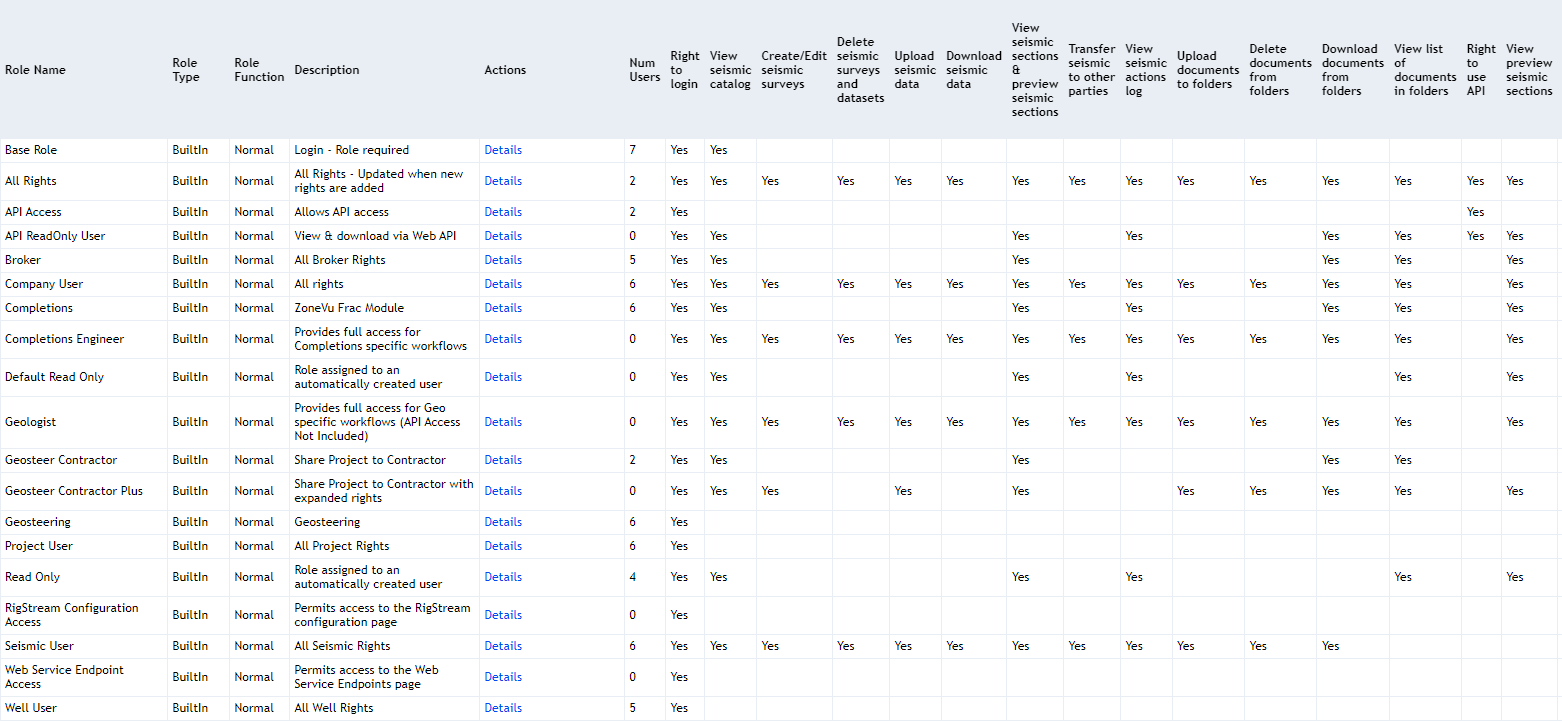
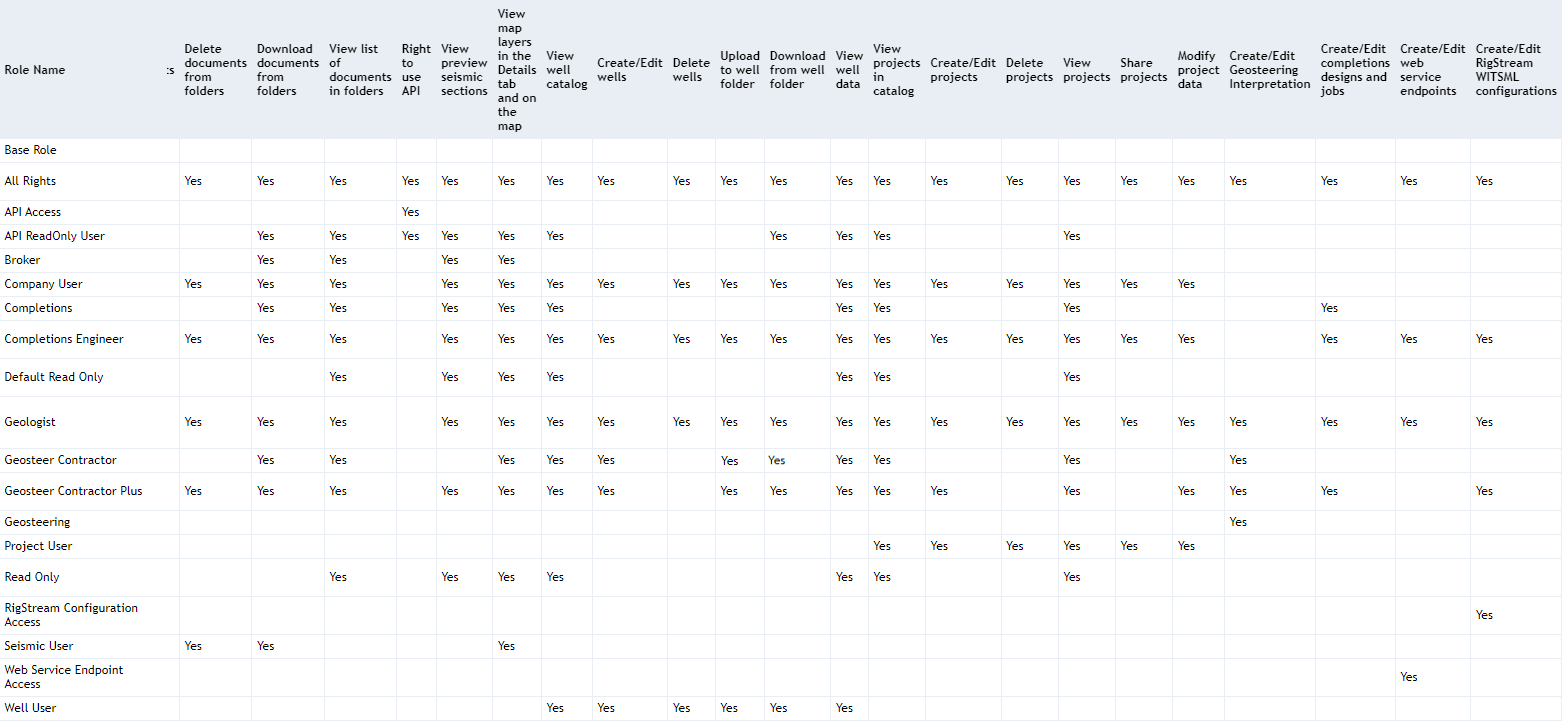
ZoneVu includes a comprehensive set of predefined Roles designed to simplify user management and ensure consistent access control across your organization. These Roles bundle specific system Rights into easy‑to‑assign configurations, helping administrators quickly set appropriate permissions for employees, partners, and contractors. The lists below outline the full catalog of default Roles available in ZoneVu, as well as the recommended Roles for User Profiles and for Project Sharing, so you can choose the level of access that best fits each user’s responsibilities. For details on the underlying Rights each Role provides, see the related article: User Profile/Sharing Rights List
Note: Your Admins can create custom roles in the 'Roles' option in the Admin menu: Creating a new Role
List of Recommended Default Roles for User Profiles:
This section highlights the Roles we recommend using when assigning permissions to users within your company. These Roles provide balanced, commonly used access levels that simplify user setup while supporting the most frequent workflows.
All Rights: The user will have all rights in the system, which will be updated when new rights are added
API Access: Allows the user to interact with the ZoneVu Web API
API Read Only: Allows the user to view & download via the ZoneVu Web API
Company User: Provides all of the Rights minus API Access, Geosteering, & Completions
Completions: Provides Rights to access and use ZoneVu Frac
Completions Engineer: Provides full access for the Completions Engineering workflows
Geologist: Provides full access for Geologist-specific workflows (API access is not included)
Geosteering: Provides Rights to Geosteer
Read Only: Default Role - Provides Rights to only view data in the ZoneVu Account
RigStream Configuration Access: Provides access to the RigStream Configuration page from the Tools Dropdown
Web Service Endpoint Access: Provides access to the Web Service Endpoints Configuration page from the Tools Dropdown
List of Recommended Default Project Sharing Roles in ZoneVu:
This section lists the recommended Roles to use when sharing Projects with external partners or contractors. These Roles provide appropriate, purpose‑built access levels that help maintain security while enabling collaboration.
API Access: Allows the user to interact with the ZoneVu Web API
API Read Only: Allows the user to view & download via the ZoneVu Web API
Completions Engineer: Provides full access for the Completions Engineering workflows
Geologist: Provides full access for Geologist-specific workflows (API access is not included)
Geosteering Contractor: Provides the fundamental Rights required to share a Project with a Geosteering Contractor
Geosteering Contractor Plus: Provides all the Rights from the Geosteering Contractor Plus expanded Well and RigStream access
Read Only: Default Role - Provides Rights to only view data in the ZoneVu Account
List of all Default User Roles in ZoneVu:
This section provides a complete catalog of every predefined User Role available in ZoneVu. These Roles represent all permission configurations included by default in the system and can be assigned to any user in your company’s ZoneVu account.
Base Role: Provides the Rights for a user to Log into the Company ZoneVu Account
All Rights: The user will have all rights in the system, which will be updated when new rights are added
API Access: Allows the user to interact with the ZoneVu Web API
API Read Only: Allows the user to view & download via the ZoneVu Web API
Broker: Provides all of the Broker Rights
Company User: Provides all of the Rights minus API Access, Geosteering, & Completions
Completions: Provides Rights to access and use ZoneVu Frac
Completions Engineer: Provides full access for the Completions Engineering workflows
Default Read Only: Old Default Role - We recommend you use the 'Read Only' Role
Geologist: Provides full access for Geologist-specific workflows (API access is not included)
Geosteering: Provides Rights to Geosteer
Geosteering Contractor: Provides the fundamental Rights required to share a Project with a Geosteering Contractor
Geosteering Contractor Plus: Provides all the Rights from the Geosteering Contractor Plus expanded Well and RigStream access
Project User: Provides all of the Project Rights
Read Only: Default Role - Provides Rights to only view data in the ZoneVu Account
RigStream Configuration Access: Provides access to the RigStream Configuration page from the Tools Dropdown
Seismic User: Provides all the Seismic Rights
Web Service Endpoint Access: Provides access to the Web Service Endpoints Configuration page from the Tools Dropdown
Well User: Provides all the Well Rights