

Exporting a Geosteering Interpretation:
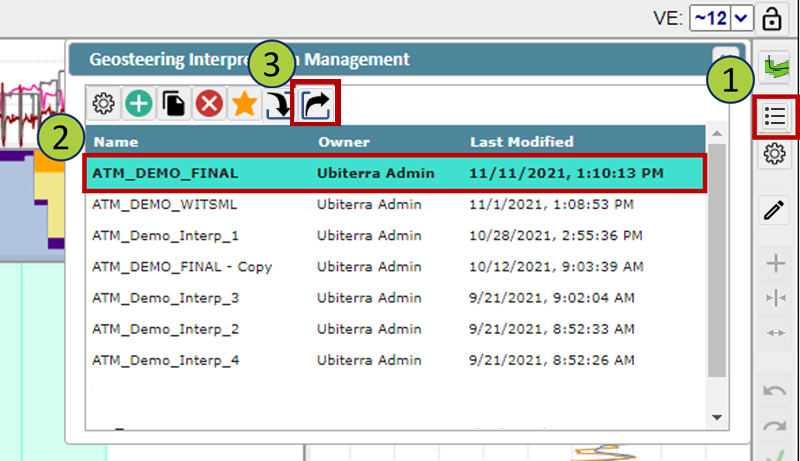
Open the Geosteering Interpretation Management window
Select the geosteering interpretation you wish to export
Click the Export button
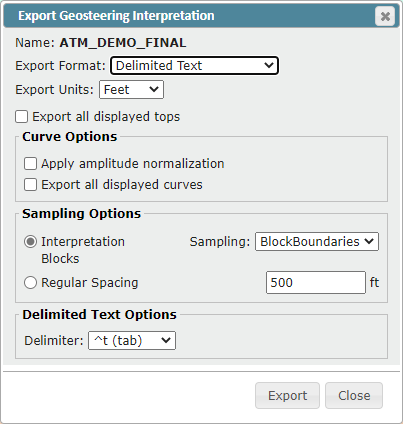
The Export Geosteering Interpretation window will open
You can export geosteering interpretations in three different formats
Delimited Text file
ZMapPlus data point file
ZoneVu JSON file
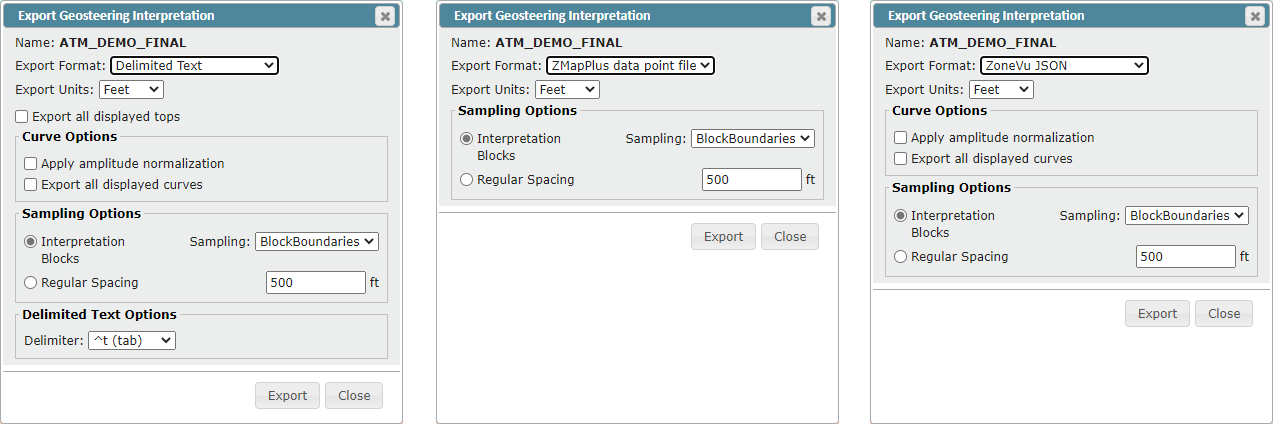
Select the desired export format
Each format has a specific GUI displaying all export options/parameters
See below for options and parameters explanation
Select the options and parameters needed for your export
Click the "Export" button to start downloading your geosteering export
Export Options:
Export all displayed tops: Will export the TVD, TVT, and Elevation for every top selected in the Tops tab of the Geosteering Interpretation Settings
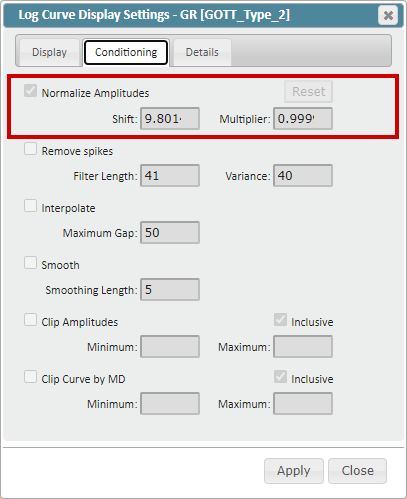
Apply amplitude normalization: Will export the “Normalized” log curves (Curve Conditioning Applied)
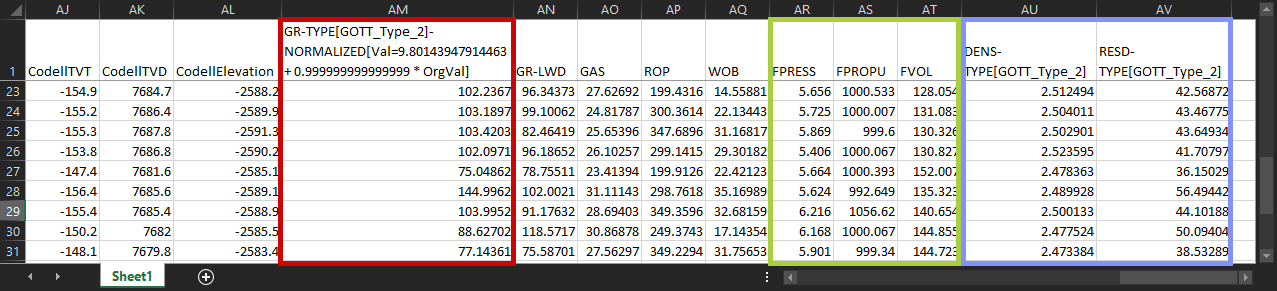
Curve Conditioning: Defined in the Conditioning tab in the Log Curve Display Settings, applies a bulk shift and multiplier to the original log data. The exported log curve header will indicate the “Shift” and “Multiplier” applied to the original log data. (See Geosteering Export Columns below for an example)
Export all displayed curves: Exports all displayed logs including (LWD, LAS, Modeled Type Log, and Frac Curves)
LWD Log: Horizontal Well (Active Well) GR log used for geosteering, as defined in the Geosteering Interpretation Settings
LAS Log: Log(s) for the Horizontal Well (Active Well) loaded into ZoneVu as a .las file
Modeled Type Logs: Type Well logs that have been modeled along the Horizontal Well (Active Well) using the Geosteering Interpretation
Frac Curves: Frac Table data displayed as a log along the Horizontal Well (Active Well)
Sampling Options
Interpretation Blocks: Exports data points based on the Geosteering Blocks
BlockBoundaries: Exports locations chosen at the start and stop MD depths for all Geosteering Interpretation Blocks
Normal Faults: Export locations chosen at block boundaries, when a fault is present, the export location is adjusted to ensure there are no multi-valued data points for the same MD
MidPoints: Exports data at the midpoint of each Geosteering Interpretation Block
Regular Spacing: Data exported is taken at regular intervals as defined by the user
Delimited Text Options: Delimiter can be specified by the user
Tab (Default)
Comma
Space
Pipe
Tilde
Geosteering Export Columns:
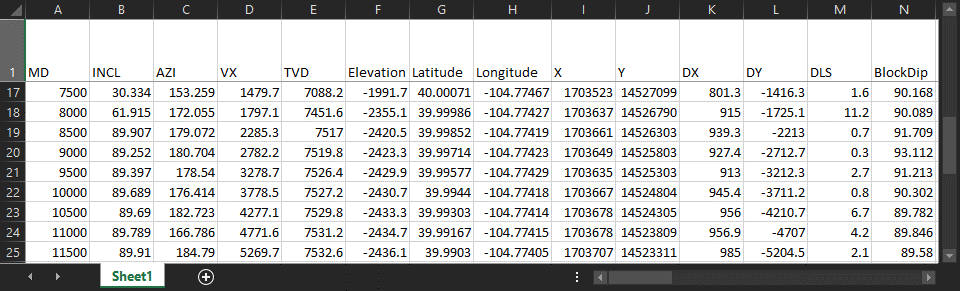
MD: MD depth of the sampled data
INCL: Inclination of the wellbore at the sampled depth
AZI: Azimuth of the wellbore at the sampled depth
VX: VX location of the wellbore at the sampled depth
TVD: TVD depth of the wellbore at the sampled depth
Elevation: SSTVD depth of the wellbore at the sampled depth
Latitude: Latitude location of the wellbore at the sampled depth (In the Project’s Datum)
Longitude: Longitude location of the wellbore at the sampled depth (In the Project’s Datum)
X: X footage of the wellbore at the sampled depth in the Datum footage
Y: Y footage of the wellbore at the sampled depth in the Datum footage
DX: X footage distance from the sample location to surface location
DY: Y footage distance from the sample location to surface location
DLS: Dogleg severity of the wellbore at the sampled depth
BlockDip: Dip of the related Geosteering Interpretation Block
"Formation Name" TVT: TVT depth of the formation at the sampled depth
"Formation Name" TVD: TVD depth of the formation at the sampled depth
"Formation Name" Elevation: SSTVD elevation depth of the formation at the sampled depth
"Log B" [Type Well Name]-NORMALIZED[VAL=Shift+Multiplier*Org Val]: Normalized Log Values for "Log B”. Header name will indicate the source well for this data, along with the Shift and Multiplier applied to “Normalize” the Orignal Log data [Red Box]
"Log A": Log values from "Log A” at the sampled depth
GR-LWD: Gamma-ray vales at the sampled depth, for the LWD log associated with the Geosteeering interpretation
GAS: Gas vales at the sampled depth, for the Active Well, taken from RigStream data or a loaded .las file
ROP: Rate of penetration values at the sampled depth, for the Active Well, taken from RigStream data or a loaded .las file
WOB: Weight on bit values from the sampled depth, for the Active Well, taken from RigStream data or a loaded .las file
Frac Log(s): Vales at the sampled depth from the specific Frac Log(s) [Green Box]
"Log A”-TYPE [Source Well Name]: Values at the sampled depth from the modeled Type Well log "Log A” [Blue Box]