Welcome to ZoneVu's Knowledge Base

Support content and general information

Removing a 0' MD block from your Interpretation

Geosteering

Removing a 0' MD block from your Interpretation

Sometimes during the process of manually adjusting interpretation blocks, you end up with a block that measures 0' MD. Follow the following steps to delete the block from your interpretation.

Last updated on 29 Jan, 2026

To delete a 0' md block from your interpretation:

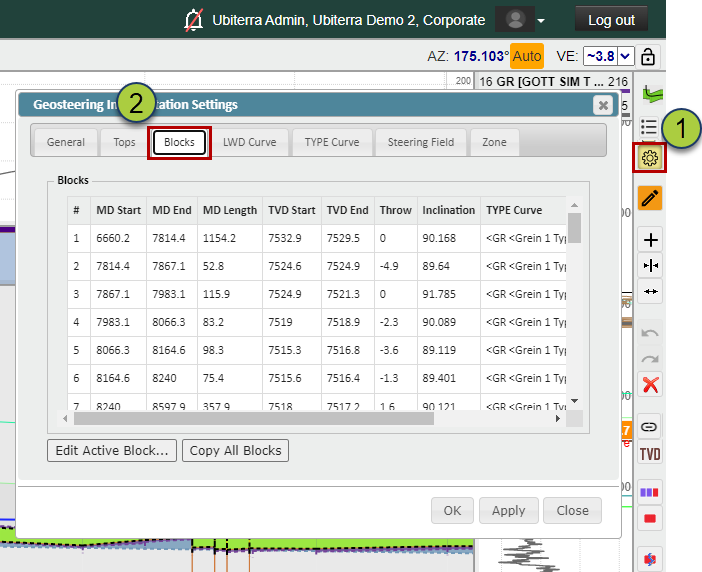
  1. Open the Geosteering Interpretation Settings

  2. Go to the "Blocks" tab

Image
  1. Scroll down the Blocks List until you find the block with a 0' MD Length and select that row

  2. Click on the Red "X" button in the Geosteering Button Tree to delete the block

  3. Note: you must have the "Edit Geosteering Interpretation" button active to edit any Geosteering Blocks
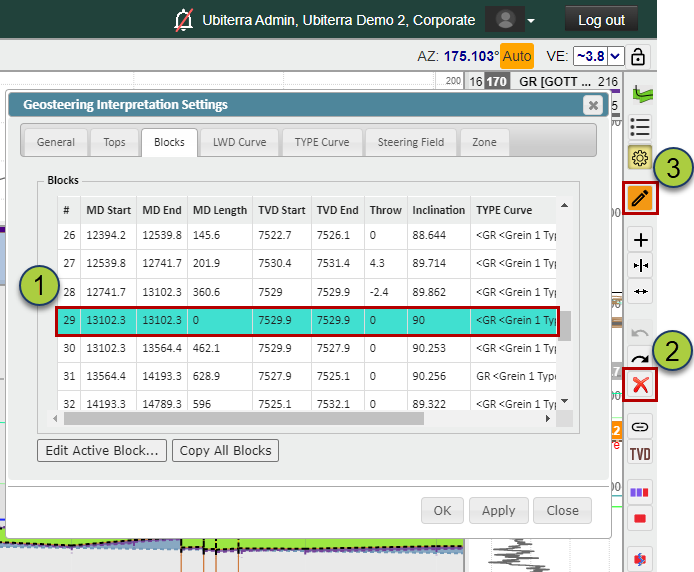
Image

Did you find this article helpful?
Previous

How to change Geosteering Horizon Styles

Next

© 2026 Ubiterra - Home of ZoneVu.