
Welcome to ZoneVu's Knowledge Base

Support content and general information

ZoneVu Frac

Exporting Frac Data

This article details how to export Frac data out of ZoneVu

Last updated on 27 Jan, 2026

ZoneVu allows you to export some or all of the data from a Frac in an Excel Workbook format. This articles details how to export this data and what options are available. 

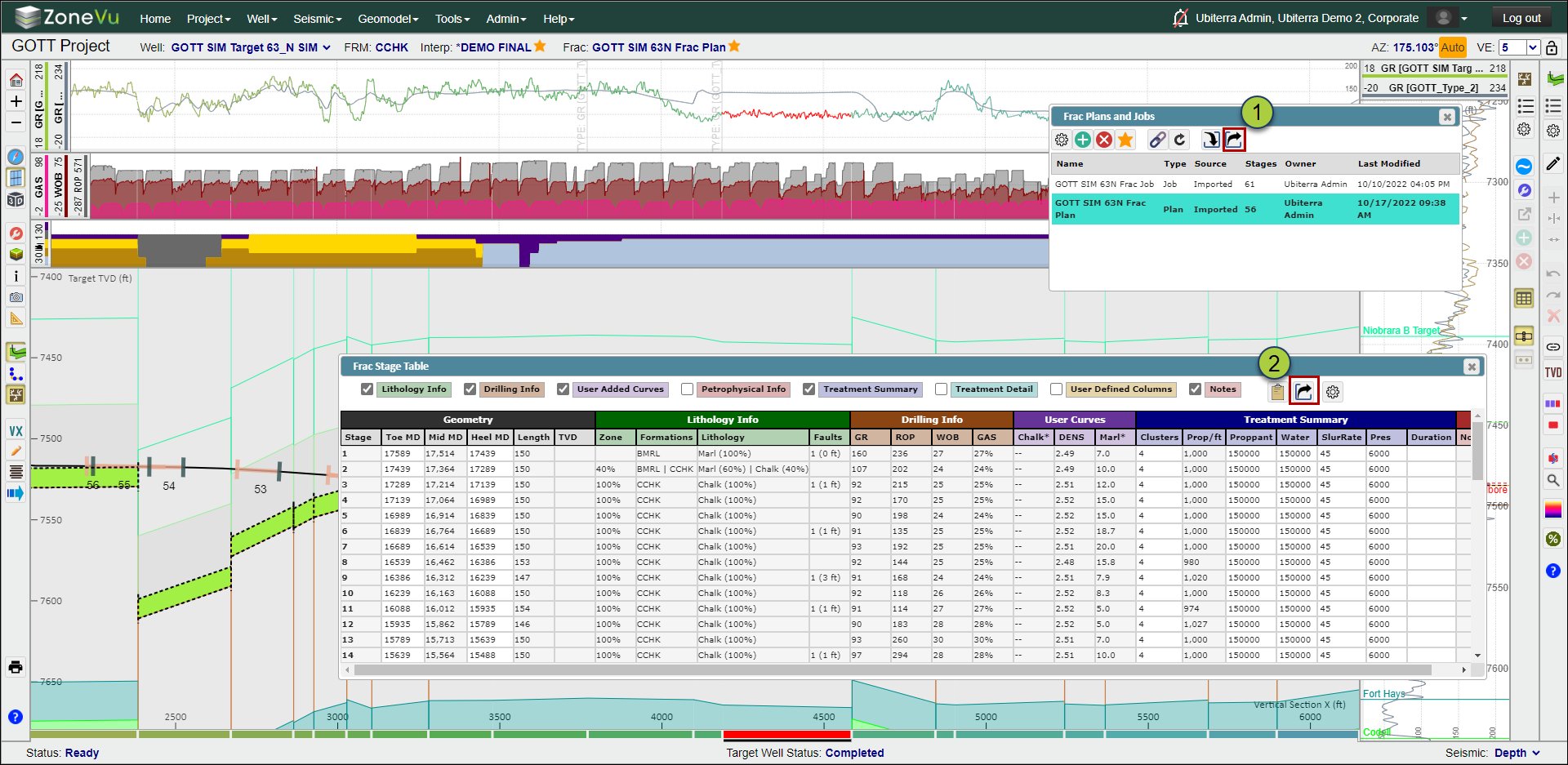
There are two ways to get to the Export Dialog Box

  1. Click the "Export" button in the Frac List dialog box

  2. Click the "Export" button on the Stage Table
Image

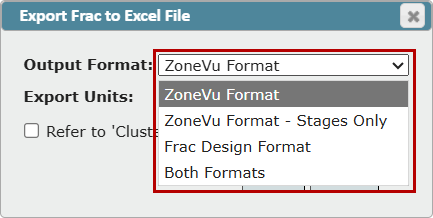
Use the "Output Format" dropdown to select the export format you need

  • ZoneVu Format: Exports a three-tab spreadsheet identical to the Completions Import Spreadsheet

  • ZoneVu Format - Stages Only: Only exports a single tab spreadsheet containing the contents of the Stage Table

  • Frac Design Format: Single tab spreadsheet with the core Frac Design data organized by Stage

  • Both Formats: Four tab export includes the ZoneVu Format and Frac Design tab
Image

Use the checkboxes to choose which data you want to be included in your export

Frac Design Output Options:

  • Include Units: Adds a units row below the column headers

  • Include Lithology: Adds Lithology calculated columns from the Stage Table (Percent in Zone, Formations, Lithology, Fault Throw)

  • Include nominal treatment: Includes the basic treatment parameters (Total Proppant, Total Water, Pressure, Slurry Rate, Duration)

  • Include Drilling Data: Includes the basic Drilling Logs from the Stage Table (GR, ROP, WOB, Gas)

  • Refer to 'Clusters' as 'Guns': Changes the Cluster headers from "Cluster 1" to "Gun 1"

ZoneVu Stage Format Options:

  • Include Lithology: Includes the Lithology section from the Stage Table in the "Stages" tab of the export

  • Include User Log Curves: Includes the User Added Curves section from the Stage Table in the "Stages" tab of the export

  • Include Summary Treatment: Includes the Treatment Summary section from the Stage Table in the "Stages" tab of the export

  • Include User Columns: Includes the User Defined Columns section from the Stage Table in the "Stages" tab of the export

  • Include Drilling Data: Includes the Drilling Info section from the Stage Table in the "Stages" tab of the export

  • Include Petrophysical Data: Includes the Petrophysical Info section from the Stage Table in the "Stages" tab of the export

  • Include Treatment Details: Includes the Treatment Detail section from the Stage Table in the "Stages" tab of the export

  • Include Notes: Includes the Notes section from the Stage Table in the "Stages" tab of the export

Image

Did you find this article helpful?
Previous

Release Notes

Next

© 2026 Ubiterra - Home of ZoneVu.