

In ZoneVu, you can bulk import Top data for one or more Wells. This article will walk you through this process. You can download the most up-to-date version of the Single and Multi-Well Top Import Spreadsheet here: Single Well Top Import Spreadsheet Download or Mulit-Well Top Import Spreadsheet Download
Bulk Importing Top Data for a Single Well:
Navigate to the "Tops" tab in the Well's Folder
Click the "Import" button

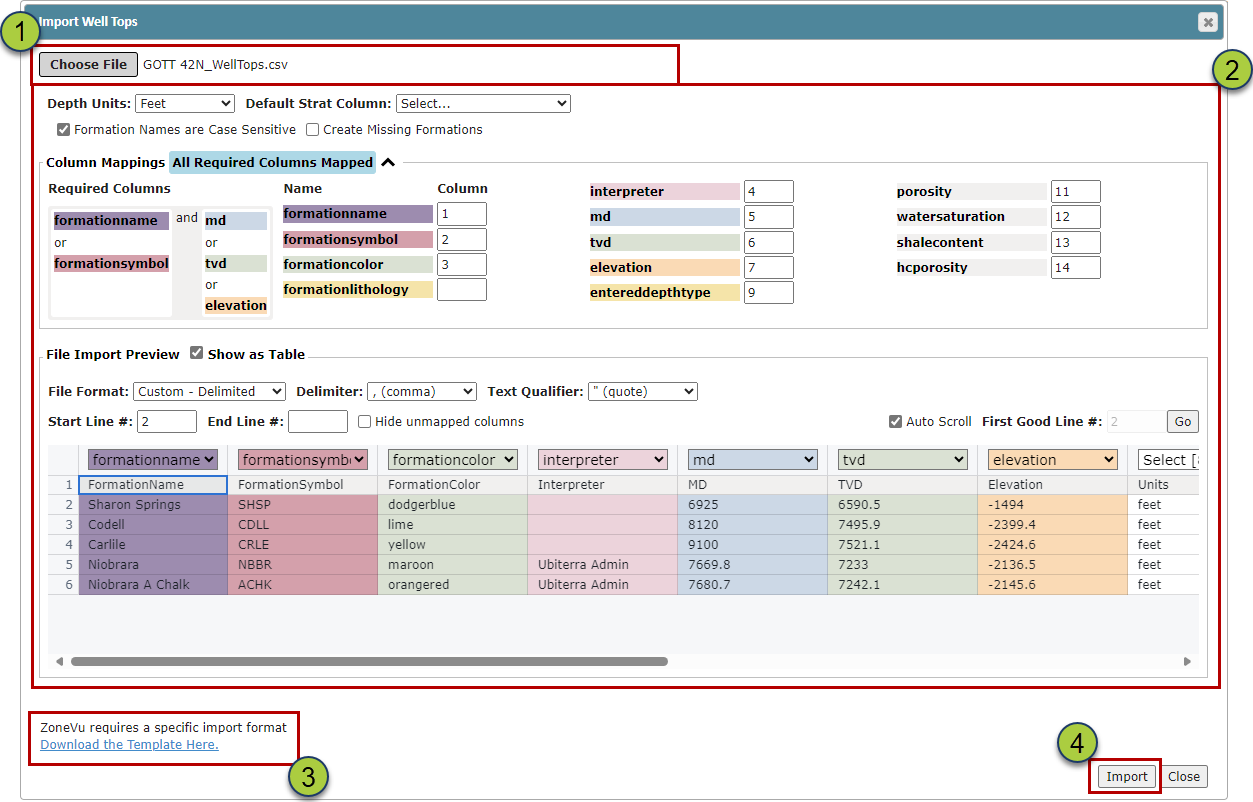
Drag & Drop or select the Top data file (.txt, .cvx, Excel Workbook, or ZoneVu Import Spreadsheet)
ZoneVu will parse the file and attempt to identify the key data columns. You can use the dropdowns at the top of each column to identify any column.
Select the data unit type (Feet or Meters)
"Create new formations in start columns for missing formation names" checkbox: When checked on, the importer will add any missing formation tops into the assigned Strat Column.
You can download the Import Spreadsheet using the "Download the Template Here" hyperlink
Click the "OK" button to import the Top data
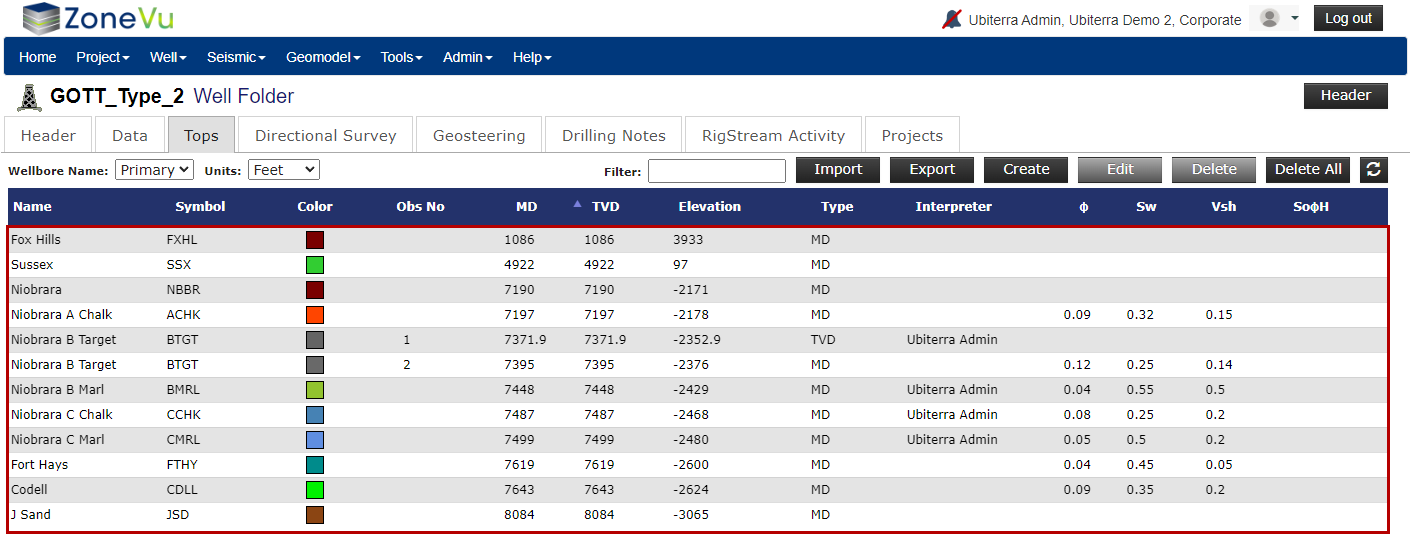
Once the import has been completed the Tops Table will display the imported Tops
Bulk Importing Top Data for Multiple Wells:
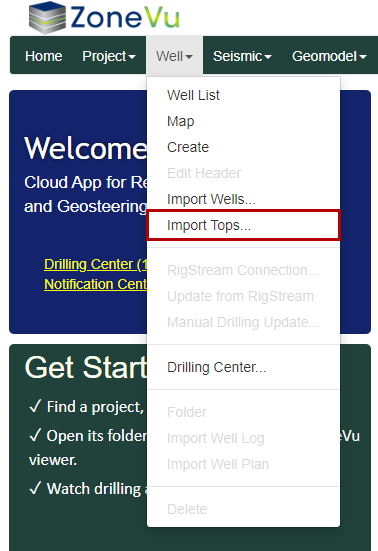
While on the Home Page select "Import Tops" under the Well dropdown
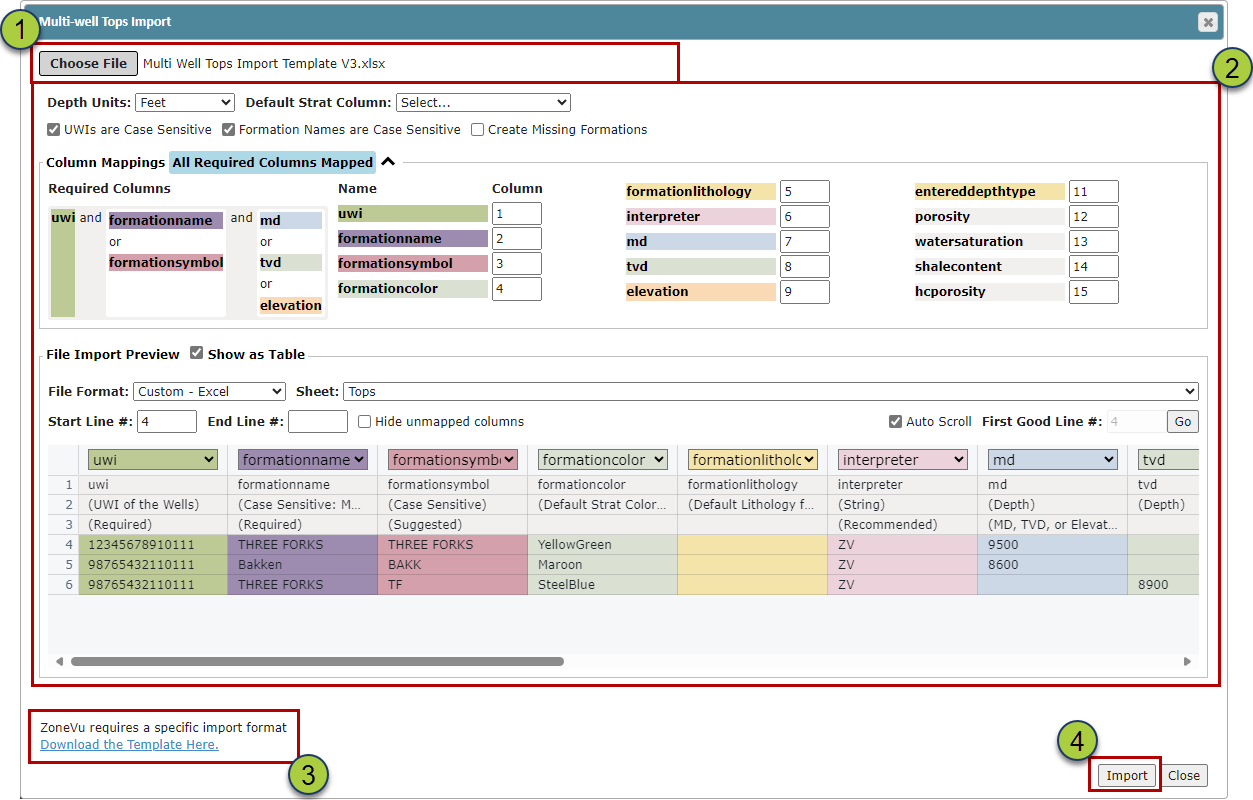
Drag & Drop or select the Top data file (.txt, .cvx, Excel Workbook, or ZoneVu Import Spreadsheet)
ZoneVu will use the UWI/API column to identify which Well the Top data is for
ZoneVu will parse the file and attempt to identify the key data columns. You can use the dropdowns at the top of each column to identify any column.
Select the data unit type (Feet or Meters)
"Create new formations in start columns for missing formation names" checkbox: When checked on, the importer will add any missing formation tops into the assigned Strat Column.
You can download the Import Spreadsheet using the "Download the Template Here" hyperlink
Click the "OK" button to import the Top data
Bulk Top Import Spreadsheet: Single Well Top Import Spreadsheet Download or Mulit-Well Top Import Spreadsheet Download
Top Import Spreadsheet Format:
If the "Create new formations in strat columns for missing formation names" option is active during import and there is no matching formationname for a formation in the referenced well's strat column then new formations will be created using the formation data from this sheet. To be valid, a row must contain a value for either the md, tvd or elevation columns
The column headers will specify which columns are Required, Recommended, and Suggested.

uwi (text): Unique Well Identifier (UWI) of the Well that the Tops data is related to. This can be the API or any text
formationname (text): The name of the Formation the pick represents. This should match the related formation in the associated Strat Column, case-sensitive
formationsymbol (text): The symbol of the Formation the pick represents, no character limit
formationcolor (text): The color of the Formation the pick represents. Any HTML color name. See HTML Color Names
formationlithology (PDT): Specify the bulk lithology associated with the top. When creating new Strat Column Formations, this lithology will be assigned to Start Column Formation and act as the default Litho Texture Litho Textures
PDT: Sandstone, Shale, Limestone, Dolomite, Chalk, Marl, MudstoneRich, MudstoneLean, Bentonite, Coal, Chert, Anhydrite, Siltstone, ShalySand, SandstoneBedded, calcareous sandstone, SandyShale, ShalyLimestone, SandyLimestone, ShalyDolostone, SandyDolostone, LimestoneShale, ShaleSandstone, SandstoneShale, ShaleLimestone, Salt, ChertyShale, Breccia, Conglomerate, Basalt, Granite, Igneous, Tuff, Crosshatch
interpreter (text): The person (etc.) responsible for the pick
md (integer): The measured depth of the pick
tvd (integer): The true vertical depth of the pick
elevation (integer): The elevation of the pick. Positive above sea level
entereddepthtype (PDT): The type of depth value that should be used to calculate the other depth values for the pick
PDT: Elevation, MD, TVD
porosity (integer): The pick's Porosity (ϕ)
watersaturation (integer): The pick's Water Saturation (Sw)
shalecontent (integer): The pick's Volume Shale (Vsh) Content
hcporosity (integer): The pick's Oil Saturation x Porosity x Hydrocarbon (SoϕH)
***PDT (Pre-Defined-Text): Denotes columns where the Bulk Top Importer is looking for specific text input. All available PDT inputs will be listed under the column description