

Home Page Updates:
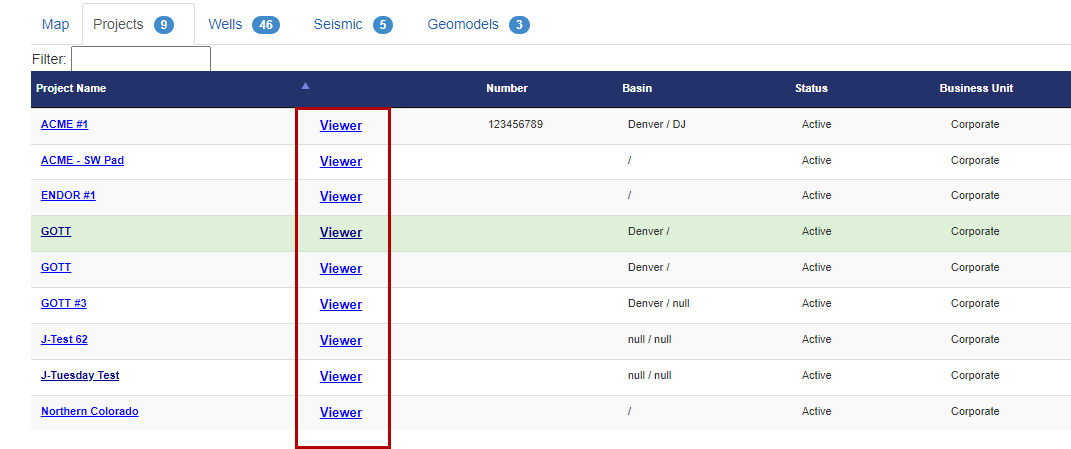
Home Page now defaults to the Projects Tab
A "Viewer" button has been added for each Project in the Project List
Data Loading Updates:
LAS Importer Updates
GUI update
Larger file dropzone
Added a blue help button
SEGY Importer Updates
GUI enhancement
Added a blue help button
Document Importer Updates
GUI enhancement
Added a blue help button
Button Labeling Updates:
Button labeling now uses consistent terminology across the Home Page
Well's Data Folder defaults to the LAS folder
Help Dropdown:
Added a link to the ZoneVu Mobile Viewer
Added a link to Import Spreadsheet Knowledge Base Article
Viewer Updates:
You can now enter the 2D Viewer without selecting a Target Well
2D Viewer Vertical Exaggeration:
Vertical exaggeration default now set to 1 or 5
Zooming in Horizontal Logs Tracks no longer changes the vertical exaggeration
Vertical exaggeration auto-calculation code enhanced
Fixed the Vertical exaggeration Lock Button bug
GUI Update:
New GUI technology deployed across most of the Viewer
Minor GUI updates
Log Visualization improvements:
Log drag & drop enhanced
Increased Log Scale Stability
The mouse cursor Icon now indicates when you will be dragging & dropping Log Headers or adjusting the Log Scale
Log rendering order using drag & drop is now supported
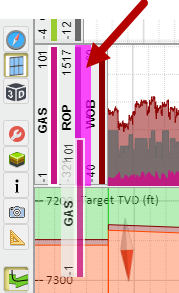
When dragging & dropping a Log Curve, a grey trapezoid will now appear indicating which log track the Curve will be placed in
Completions Module:
Added a download link for the Frac Import Spreadsheet to the Frac Import dialog box
Frac Data Visualization performance has been increased in the Map Viewer
Bug Fixes:
Printing problems when the browser zoom is not set to 100%
Snapshot support for Horizon & Fault color and Horizon line thickness
WDL frac data download bug
Well Plan rendering bug
New Knowledge Base Articles:
The Knowledge Base has been reorganized to make it easier to navigate
ZoneVu - Import Spreadsheets Download
Creating a Project and adding data to the Project
Loading and creating data in a Geomodel
Exporting Frac Data
Importing Documents into ZoneVu
ZoneVu - Import Spreadsheet Download